From Sketch to Score: How Animators Can Build Original Soundtracks with AI
Animators pour hours into every frame — the timing of a gesture, the weight of a footstep, the breath between scenes. Yet when it comes to audio, many projects stall. Licensing is expensive, stock music feels generic, and hiring a composer is out of reach for solo creators. That’s where Musick AI changes the game. As a fully featured AI Music Generator, it puts original, royalty-free audio directly in the hands of visual artists — no music theory required.
I. Why Animators Struggle with Audio
Sound design is often the last thing animators think about, but audiences feel it immediately. A poorly matched soundtrack drags down even polished visuals. The problem isn’t a lack of options — it’s the friction involved in finding something that actually fits.
Stock libraries offer thousands of tracks, but few match a scene’s exact tempo, mood, or emotional arc. Custom compositions require back-and-forth with a composer, which costs both time and money. For indie animators, game developers, and content creators, neither option is practical at scale.
II. What Musick AI Actually Does
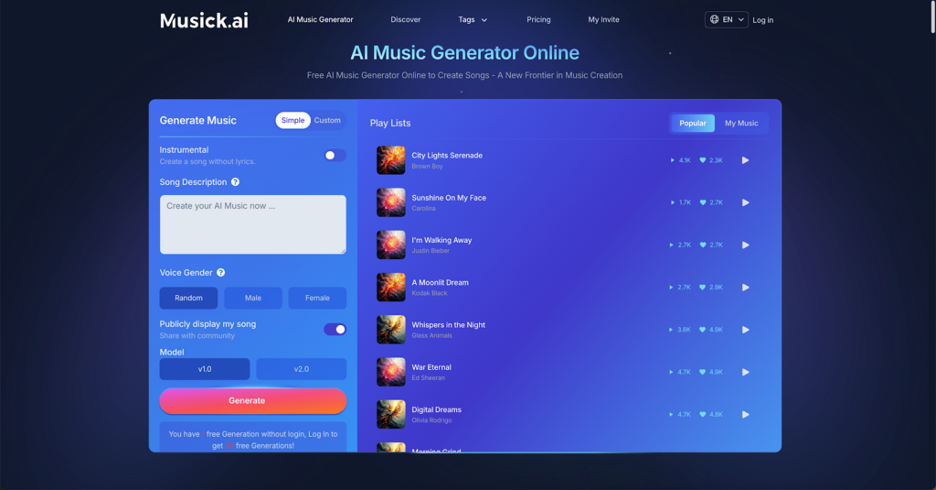
Musick AI is an online AI Music Maker built to generate high-quality, emotionally expressive music across a wide range of genres. Users describe what they want in a text prompt — genre, mood, instruments, tempo, structure — and the tool produces a full composition based on those inputs.
The supported genres are broad: EDM, R&B, Jazz, Pop, Rap, Metal, Rock and Roll, Hip-Hop, Blues, Reggae, Saxophone, K-Pop, Classical, Disco, and Country. That range matters for animators, because a thriller short needs something completely different from a children’s educational clip or a lo-fi aesthetic piece.
Beyond basic generation, the platform includes three additional tools:
- AI Song Lyrics Generator — input a genre and receive matching lyrics
- AI Beat Producer — write out melody notes and produce a beat
- AI Rap Generator — design a music sheet or playlist and select the genre
Each tool feeds into the same creative workflow, making it possible to build an audio layer that’s genuinely tailored to a specific visual project.
III. Prompting for Visual Sync
The quality of the output depends heavily on the prompt. Musick AI works best when the description is detailed and specific — not just “sad piano” but something like “a slow, melancholic classical piece with solo piano, minor key, around 60 BPM, suited to a montage scene with soft rain imagery.”
Building a Scene-Specific Prompt
Think through each element of the scene before writing the prompt:
- Pacing — Is the animation fast-cut or slow and meditative? Match the tempo.
- Emotion — What should the viewer feel? Tension, nostalgia, joy, dread?
- Instrumentation — Strings for drama, synths for sci-fi, acoustic guitar for warmth.
- Structure — Should the track build toward a climax? Does it need an intro/outro?
The official prompt example on the Musick AI site recommends including structure elements like verse, chorus, bridge, and outro when applicable. For animation, replacing these with visual cues — “builds to a peak at the 45-second mark” — gives the generated track a better chance of matching the edit.
IV. Vocal vs. Instrumental: Choosing the Right Mode
Musick AI offers two core generation modes: standard (with vocals) and instrumental. For most animation work, instrumental is the right choice. Vocals pull attention toward language rather than image, which competes with visual storytelling.
The platform allows users to choose the vocalist’s gender when generating songs with lyrics — useful for music-driven animated pieces or opening sequences where a song sets the scene. The instrumental mode strips that out entirely, leaving a clean, layered track that sits underneath the visuals without fighting them.
When to Use Vocals
- Title sequences or end credits
- Music video-style animation
- Character-driven scenes where the lyrics reinforce narrative
When to Use Instrumental
- Action sequences, chase scenes, or montages
- Dialogue-heavy scenes where audio needs to stay subtle
- Ambient or background loops throughout a longer piece
V. Looping and Extending for Long-Form Projects
Short animations can be scored with a single generated track. Longer projects — a series pilot, a short film, an explainer video — need more flexibility. Musick AI includes an AI Music Extender among its tools, which allows users to stretch a track beyond its original length while keeping the musical coherence intact.
The platform also supports an AI Music Remixer, which is useful when a track is close but not quite right. Rather than starting over with a new prompt, the remixer can adjust the existing output, shifting its feel without losing what was working.
These tools together form a proper production toolkit for animators who need audio that evolves across scenes rather than looping the same 30 seconds on repeat.
VI. Copyright, Licensing, and Publishing
One of the biggest concerns for animators who plan to publish — whether on YouTube, Instagram, TikTok, or for commercial use — is whether the music will trigger copyright claims or require additional licensing fees.
Musick AI addresses this directly. All music generated through the platform is royalty-free, built on a consent-based approach that protects the rights of underlying artists. Users receive a commercial license with their tracks, meaning the generated AI music can be published across social media platforms and used in commercial projects without additional clearance.
The platform explicitly supports use cases including YouTube content, filmmaking, podcasts, game development, and education — all common outputs for animators working at different scales.
VII. Practical Workflow for Animation Projects
Putting this together into an actual pipeline, here’s how an animator can move from a blank timeline to a finished audio layer:
- Lock the picture edit first — know the exact duration and emotional arc of each scene before generating music.
- Break the project into cues — a three-minute short might need three or four distinct musical moments, not one continuous track.
- Write specific prompts for each cue — reference the scene’s pacing, emotion, and instrumentation needs.
- Generate and compare — use the free daily generations to test variations before committing to a direction.
- Use the Beat Producer or Remixer to fine-tune any track that’s mostly right but needs adjustment.
- Download and drop into the timeline — all generated tracks are downloadable, with the commercial license attached.
Musick AI is built for creators who need audio that works, not just audio that exists. For animators ready to stop settling for stock music, it offers a faster, more personal path to a soundtrack that actually belongs to the project.
Conclusion
Musick AI brings audio production within reach for animators who’ve always treated sound as an afterthought. With genre flexibility, a clear prompt-based workflow, built-in tools for extending and remixing, and a royalty-free commercial license on every track, it removes the barriers that used to separate visual creators from original music. The gap between a great animation and a great soundtrack has never been smaller.

![Best Email Marketing Options Reviewed [Feature Table Inside]](https://www.fontmirror.com/en/wp-content/uploads/2025/10/Email-Marketing-Options-768x511.jpg)