Top 5 Enterprise File Transfer Solutions for Large Data Volumes in 2026
Your network is 10 Gbps. Your transfer is running at 490 Mbps. Nothing is broken — and that gap is the whole reason Enterprise File Transfer exists as a software category instead of a line item in your bandwidth budget.
Here is the measurement behind that. On a 10 GbE path with 90 ms of round-trip latency, ESnet recorded 8.2 Gbps of usable throughput — until packet loss hit 0.0046%. At that point the same path delivered 490 Mbps. A dataset that should have cleared in under three hours now takes almost two days. Buying more bandwidth does not fix it, because the bottleneck is the transport protocol’s reaction to loss rather than the pipe — and neither does a Managed File Transfer (MFT) platform on its own, since governing a transfer and accelerating one are different jobs.
Most teams discover this the expensive way: after buying more bandwidth, after a 40 TB restore misses its window, after a partner delivery fails at 90% and starts over. This guide compares the five platforms enterprises most often shortlist when data volumes outgrow FTP scripts and consumer cloud drives — Raysync, IBM Aspera, Signiant, MASV, and FileCatalyst — and gives you the criteria that actually separate them.
What qualifies as an enterprise file transfer solution?
Plenty of tools move files. Very few survive contact with enterprise volume, and the line is sharper than most vendor pages admit.
An enterprise-grade platform has to clear four bars at once:
It has to be indifferent to distance and loss. TCP congestion control interprets any dropped packet as congestion and halves its sending rate. Across a 150 ms path between continents, that recovery behaviour is what caps throughput — not the link. A solution qualifies only if it uses a loss-tolerant transport (typically UDP-based, or a heavily modified TCP with its own rate control) that keeps the pipe full when loss is present.
It has to survive interruption without losing progress. At 40 TB, a transfer that restarts from byte zero after a network blip is not a transfer, it’s a liability. Checkpoint resume — restarting from the last verified block — is non-negotiable.
It has to be governable. Who moved what, to whom, when, and did it arrive intact? Role-based access control, immutable audit logs, and integrity verification (checksums on arrival) are what separate an enterprise tool from a fast FTP client.
It has to be automatable. If a human has to click something for each transfer, the system does not scale to thousands of daily jobs. Scheduling, folder monitoring, event triggers, and a real API are the minimum.
Anything missing one of these four is a file-sharing product wearing an enterprise badge.
Enterprise file transfer vs MFT vs EFSS
These three categories overlap enough that buyers routinely evaluate the wrong one, then wonder why the shortlist feels incoherent.
Enterprise large file transfer is about moving very large payloads fast across distance. The engineering effort goes into the transport layer: throughput, latency tolerance, resume, and integrity at terabyte scale.
Managed File Transfer is the governance layer around file movement — scheduling, workflow automation, protocol brokering, audit trails, and centralized policy across every transfer an organization runs. MFT platforms often accelerate too, but their reason for existing is control and compliance rather than raw speed.
Enterprise file sync and share (EFSS) is about keeping people and folders in agreement. Bidirectional sync, versioning, secure links, and collaboration across sites. Throughput matters, but the defining problem is state reconciliation, not transfer duration.
In practice most enterprises need two of the three. A post-production studio needs acceleration plus sync. A financial services firm needs MFT governance plus acceleration for nightly data warehouse feeds. The platforms below sit in different places on that map, which is exactly why comparing them on Gbps alone produces a bad decision.
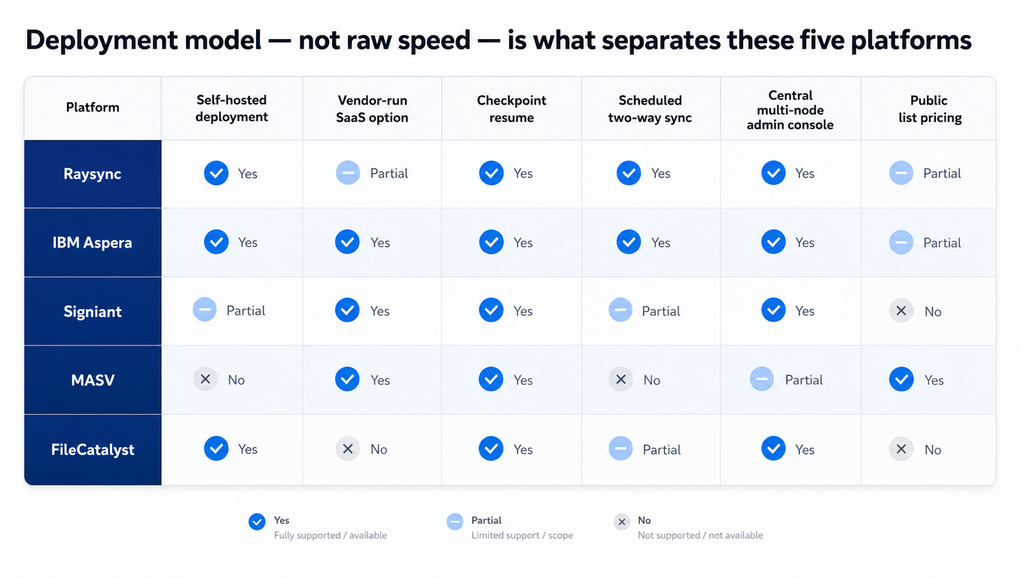
Where the five platforms actually differ. “Partial” means the capability exists but is limited in scope or sold separately. Compiled from vendor documentation, August 2026.
How we evaluated these solutions
Eight criteria, weighted toward the things that break at scale rather than the things that demo well.
| Criterion | What we looked for |
|---|---|
| Large-file and high-volume performance | Sustained throughput on multi-terabyte payloads and behaviour under high file counts, not peak burst numbers |
| Long-distance reliability | Documented behaviour at high RTT and non-zero packet loss |
| Security and encryption | Cipher specifics in transit and at rest, authentication model, and third-party certification |
| Checkpoint resume and recovery | What is re-verified after failure, and whether resume is automatic |
| Deployment options | Self-hosted, vendor-hosted SaaS, hybrid, air-gapped |
| Automation and synchronization | Scheduling, hot folders, event triggers, one-way and two-way sync, API/CLI/SDK coverage |
| Administration and auditability | Central console across multiple nodes, RBAC, audit log depth |
| Integrations and pricing model | Storage and identity integrations, and whether cost scales with volume, bandwidth, or seats |
A note on method: throughput claims published by vendors are measured on their own reference networks and are not comparable to each other. Where we cite a performance figure below, it is labelled as the vendor’s own claim. Where we cite a measured number, it comes from an independent source.
Enterprise file transfer solutions compared
| Raysync | IBM Aspera | Signiant | MASV | FileCatalyst | |
|---|---|---|---|---|---|
| Transport | Proprietary UDP acceleration with intelligent UDP/TCP switching | FASP (UDP-based) | Patented network optimization over the SDCX data plane | Accelerated cloud transfer over a 400+ server AWS-backed network | Proprietary UDP-based protocol |
| Deployment | Self-hosted on-premises or in your own cloud. Raysync Cloud is a separate SaaS product (10 users, 1 Gbps) | On-premises, cloud, hybrid; Aspera on Cloud as SaaS | Hybrid SaaS: cloud control plane for Media Shuttle and Jet; Flight Deck’s Manager is customer-installed | SaaS only; on-premises Agent and Storage Gateway connect your storage | Self-hosted on-premises or customer-deployed cloud |
| Encryption | AES-256 in transit and at rest; TLS 1.3, custom TLS certificates supported | AES-128/192/256 (CFB or GCM), SSH-authenticated sessions, client-side encryption at rest | TLS in transit; AES-256 documented for Flight and the Signiant App | TLS 1.2+ in transit, AES-256 at rest | AES-256 |
| Checkpoint resume | Yes, with transfer verification | Yes — four documented resume levels (-k 0 to -k 3) | Yes | Yes, automatic checkpoint restart with MD5 verification | Yes, checkpoint restart |
| Two-way sync | Yes — scheduled or event-triggered, one-way and two-way (not continuous real-time) | Yes — Aspera Sync, bundled with HSTS/HSTE | Automation and point-to-point routes rather than bidirectional sync | No | Hot folder automation, one-way mirroring, incremental transfer |
| Central administration | Single console with RBAC and audit logs; Raysync Hub for multi-node estates | Aspera Console and Orchestrator | Unified Signiant console | Web dashboard with immutable audit trail | FileCatalyst Central |
| Notable certifications | TPN certified, ISO 27001, states HIPAA compliance | HIPAA-relevant deployments documented by IBM | SOC 2, TPN Gold Shield (assessed by ISE, 2023) | SOC 2 Type II, ISO 27001:2022, TPN vendor roster, HIPAA BAA available | Fortra’s SOC 2 Type 1 and FIPS 140-2/140-3 attestations attach to GoAnywhere MFT, not to FileCatalyst |
| Pricing model | Bandwidth-tier licensing, unlimited users; annual subscription or perpetual licence. Raysync Hub: $6,000/year including six online nodes | Subscription by throughput tier (AWS Marketplace list: $25,200/yr at 100 Mbps to $107,640/yr at 10 Gbps, 12-month term) | Annual subscription with connector packs; no public pricing | Published metered pricing: 15 GB/month free, $0.25/GB pay-as-you-go, down to $0.19/GB on annual plans | Quoted; no public pricing |
The five solutions reviewed
1. Raysync — best all-round fit for self-hosted enterprises moving large volumes across regions
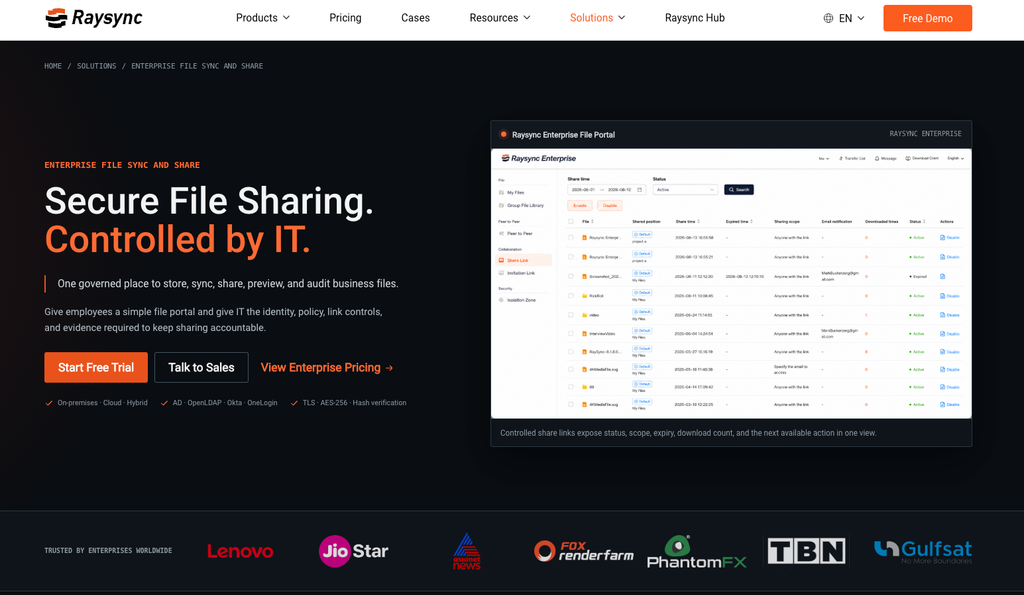
Raysync is an international, Singapore-headquartered enterprise file transfer vendor whose flagship Enterprise File Transfer platform combines proprietary UDP-based WAN acceleration with an EFSS layer — which is unusual. Most competitors pick one side of that line.
The transport does intelligent UDP/TCP switching rather than forcing every transfer down a UDP path, and supports peer-to-peer transfer so data can move directly between endpoints instead of hair-pinning through a central server. Security is specified rather than gestured at: AES-256 in transit and at rest, TLS 1.3 transmission with support for your own TLS certificates, checkpoint resume, and transfer verification. On the governance side you get centralized administration with role-based access control and audit logs, secure sharing links, plus REST API, SDK, CLI, and enterprise identity integrations for the automation layer. Raysync Enterprise is TPN certified and ISO 27001 certified, and Raysync states HIPAA compliance — a set that matters if you sell into media or life sciences.
Sync is a first-class feature, not an afterthought: scheduled or event-triggered, one-way or two-way — automated rather than continuous real-time replication. The current offering also includes AI-agent integration for natural-language remote file operations, which is early but points at where the category is going.
Licensing is the quiet advantage. Raysync licenses by bandwidth tier with unlimited users on an annual subscription, so cost tracks the capacity you provision rather than the number of people who touch a file or the terabytes they move. Perpetual licensing is also offered. For estates that already run transfer infrastructure across several sites, Raysync Hub adds a dedicated management console — centralized node and client-agent management, immediate, one-time and recurring scheduling, real-time monitoring, per-node bandwidth controls, and detailed operations logs — at $6,000 per year including six online nodes, with additional nodes at $600 per node per year.
Best for: enterprises that need on-premises or hybrid control, cross-region performance, and sync plus transfer in one platform. Watch for: Raysync Enterprise and Raysync Hub are both self-deployed — you run the server. If you want zero infrastructure of your own, Raysync Cloud is the SaaS product, but it caps at 1 Gbps and ten users, which puts it outside the scope of this comparison.
2. IBM Aspera — the deepest toolchain, at enterprise-toolchain cost
Aspera is the category’s reference implementation. FASP, its UDP-based transport, was a rewrite of the transport layer specifically to decouple throughput from latency and loss, and the toolchain built around it since Aspera’s 2004 founding — IBM closed its acquisition in January 2014 — is the deepest in the category: High-Speed Transfer Server at the core, with Faspex for person-to-person delivery, Shares for storage access, Console and Orchestrator for management and workflow, Proxy Server and HTTP Gateway for network edge cases, and faspio Gateway for streaming and database replication. Bidirectional replication comes from Aspera Sync, now bundled into the transfer server rather than sold separately. IBM added a lighter tier, Aspera Lite, in July 2025 for smaller on-premises deployments.
The engineering detail is genuinely good. ascp, the command-line client, exposes AES at 128, 192, or 256 bits in CFB or GCM mode, authenticates the session over SSH, and offers four explicit resume levels: re-transfer everything, compare file attributes, compare attributes plus sparse checksums, or compare attributes plus full-file checksums. That last distinction is exactly the kind of control an infrastructure team wants after an interrupted 30 TB job — and most competitors do not document it as precisely.
The trade-off is complexity and cost. You are assembling a toolchain, not deploying a product, and the licensing reflects it: IBM’s AWS Marketplace listing prices Aspera Enterprise by throughput ceiling, from $25,200 a year at 100 Mbps to $107,640 a year at 10 Gbps on a 12-month term (list rates as of August 2026; IBM publishes no pricing on ibm.com). Negotiated pricing differs, but the shape is instructive — you buy a speed limit.
Best for: large organizations with dedicated infrastructure teams, existing IBM relationships, and workflows that need every module. Watch for: total cost of ownership across modules, and the operational overhead of running the full stack.
3. Signiant — the media industry’s default, built around a SaaS control plane
Signiant’s SDCX architecture separates a cloud control plane from a storage-agnostic data plane, which produces a genuinely useful property: for Media Shuttle and Jet, content moves directly between endpoints — devices, private data centres, public clouds — without routing file data through Signiant’s servers. You get SaaS convenience for orchestration and identity without handing your media to a third-party relay. The exception is Flight, where the gateway converts TCP to Signiant’s UDP protocol and routes cloud object-storage traffic through Signiant’s regional infrastructure.
The portfolio maps cleanly to workflows. Media Shuttle handles person-initiated sends and is close to ubiquitous in broadcast and post-production. Jet automates system-to-system routes with scheduling, hot folders, and API integration at multi-Gbps speeds. Flight Deck covers large-scale distributed operations — it absorbed the former standalone Manager+Agents and Flight products — and Media Engine adds federated search across distributed storage. A fifth product, Verify, for spec-checking and distributing deliverables, began rolling out in 2026. Signiant holds SOC 2 and a TPN Gold Shield assessment conducted by Independent Security Evaluators, and uses TLS for data in transit, with AES-256 documented for Flight transfers and the Signiant desktop app.
Two caveats. First, deployment flexibility is partial by design: on-premises storage requires SDCX Server software on your network, and for the SaaS products the control plane is Signiant’s cloud — Flight Deck is the exception, with a customer-installed Manager that orchestrates transfers locally. If you have a hard disconnected-network requirement, make Signiant prove the specific deployment rather than assuming it. Second, pricing is opaque — Jet is sold as an annual subscription with packs of “connectors,” virtual tokens consumed when routes are created (each route consumes two), and no rates are published. Budgeting requires a sales conversation.
Best for: media and entertainment organizations, and any business whose partners already run Signiant. Watch for: connector-based licensing economics as your route count grows. Note also that Battery Ventures took a majority stake in Signiant in January 2025 — worth factoring into a long-horizon platform bet.
4. MASV — the cleanest economics for burst and ad-hoc volume
MASV is the one platform here that publishes its price list, and that transparency is the point. There is no infrastructure to deploy: 15 GB a month free, $0.25/GB pay-as-you-go beyond that, and annual plans from $58/month for 250 GB up to $973/month for 5 TB — an effective rate falling from roughly $0.23 to $0.19 per GB. Uploads are stored free for five days, then $0.07/GB/month. Pre-buy credit packs (5, 10 and 25 TB, valid 180 days) sit between the two, and volumes above 25 TB move to custom pricing.
Technically it is a cloud-native accelerated transfer service on an AWS backbone of 400-plus servers — an accelerated store-and-forward relay, not peer-to-peer. Files are chunked and sent in parallel, with automatic checkpoint restart, MD5 integrity verification, malware scanning on upload, and secure staging so a delivery survives an offline recipient. Security posture is strong for a SaaS product: TLS 1.2+ in transit, AES-256 at rest, SOC 2 Type II, ISO 27001:2022 (certified January 2026), membership of the MPA’s TPN vendor roster, HIPAA BAAs, SAML SSO with mandatory MFA, RBAC, and immutable audit trails. Note that TPN roster membership is not the same as Signiant’s third-party Gold Shield assessment.
The limits are structural. The service itself cannot be self-hosted — MASV ships an on-premises Agent and Storage Gateway to connect your own storage, but the transfer path always runs through MASV’s cloud, which rules out data-residency-constrained and air-gapped workloads. There is no true bidirectional sync. And metered pricing that looks cheap at 2 TB a month looks very different at 50 — which is precisely the crossover the next chart makes concrete.
Best for: ad-hoc and burst deliveries, external partner exchange, and teams that want zero infrastructure. Watch for: cost at sustained high volume; no self-hosted transfer path.
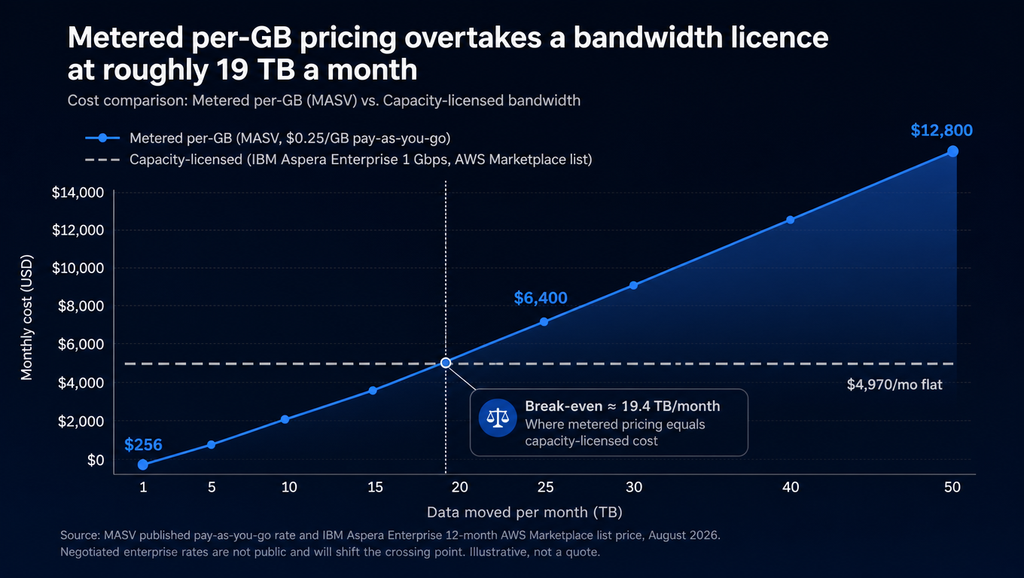
Metered and capacity-based pricing cross at roughly 19 TB a month using published list rates. Negotiated enterprise pricing shifts the crossing point, but the shape of the curve does not change.
5. FileCatalyst — capable UDP acceleration inside a broader security portfolio
FileCatalyst, acquired by Fortra in 2021 and now marketed under the GoAnywhere portfolio — filecatalyst.com redirects there — is a long-standing UDP acceleration product with a complete component set: Server for storage and account mapping, HotFolder for scheduled automation, Express for drag-and-drop transfers, TransferAgent for HTML5 and REST access, Link for email-based sharing, Central for monitoring across the deployment, plus CLI, mobile apps, a reverse proxy for firewall-isolated deployments, and SDKs for Java, C++, .NET, and REST.
Fortra describes the transport as a proprietary UDP-based protocol (its own page calls it both “patent-pending” and “patented”) and claims speeds up to 10 Gbps at “full line speed with an amazingly low 0.25% overhead.” The feature set is well-suited to media: on-the-fly GZIP and LZMA compression, incremental transfers that send only changed portions of a file (Fortra cites reductions of up to 90% on suitable content), and support for transferring growing files that are still being written by an encoder. Security covers AES-256 and MD5 verification, with IP filtering at the edge. One thing to check against your compliance list: Fortra’s formal attestations — SOC 2 Type 1, FIPS 140-2 and 140-3 crypto modules, Drummond AS2 — attach to GoAnywhere MFT, not to FileCatalyst, and Fortra publishes no TPN certification for FileCatalyst despite its media positioning.
The convergence with GoAnywhere is real and shipping. A FileCatalyst Service landed inside GoAnywhere MFT in version 7.7.0 (December 2024), introduced as beta, and has been extended in every release since — a FileCatalyst List task and Workflow reporting in 7.8.0, Gateway integration, audit logging and FIPS-mode support after that. Fortra markets it as reaching speeds up to ten times faster than SFTP, FTPS or HTTP. Parts of the client-side integration are still on the roadmap, so if a single governed MFT platform with acceleration built in is the goal, confirm which pieces are GA for your version.
One operational note: FileCatalyst Direct 4.0.0 (March 2025) removed the legacy Swing remote admin tools in favour of HTML admin and requires Java 11 or later. The current line is 4.1.0.
Best for: organizations that want self-hosted UDP acceleration and are already inside Fortra’s ecosystem. Watch for: which parts of the GoAnywhere integration are GA versus beta for your release; no published pricing.
Best enterprise file transfer solution by use case
Recurring machine-to-machine pipelines across regions (data centre replication, nightly warehouse feeds, render farm distribution). You need scheduling, deterministic throughput, and node-level bandwidth control. Raysync and Aspera lead here; Signiant Jet is strong if your endpoints are media storage. Raysync Hub is the differentiator once you are managing more than a handful of transfer nodes.
Ad-hoc partner deliveries and burst volume. MASV, comfortably. No deployment, predictable per-GB cost, and recipients need nothing installed. Revisit the decision if sustained monthly volume climbs past roughly 20 TB.
Media and post-production collaboration. Signiant if your production partners already standardized on Media Shuttle — network effects are real in this industry. Raysync if you need comparable acceleration under your own roof with TPN certification on the vendor side; FileCatalyst is a capable self-hosted alternative, but note that Fortra publishes no TPN certification for it, which matters if your studio partners audit that.
Distributed teams that need shared, always-current folders rather than one-off sends. This is an Enterprise File Sync and Share problem layered on an acceleration problem, and the shortlist narrows fast: Raysync and Aspera Sync both offer genuine scheduled two-way sync, while MASV does not attempt it and Signiant addresses it through automated routes rather than sync.
Regulated, sovereign, or air-gapped environments. Self-hosting is mandatory, which eliminates MASV’s transfer path and constrains Signiant to Flight Deck’s customer-installed Manager. Raysync, Aspera, and FileCatalyst remain. Weigh certifications against your auditors’ actual list — ISO 27001, HIPAA, SOC 2, and TPN are not interchangeable, and several of them attach to a specific product rather than to the vendor as a whole.
Final recommendation
If you are moving large data volumes across distance and you want one platform rather than three, Raysync Enterprise is the most complete fit: UDP-based acceleration with intelligent UDP/TCP switching, AES-256 encryption in transit and at rest, checkpoint resume with transfer verification, genuine two-way sync, RBAC and audit logging, REST API, SDK and CLI for automation, and bandwidth-tier licensing with unlimited users so costs do not climb with headcount or terabytes. Add Raysync Hub if you operate transfer nodes across multiple sites and need one console over all of them — at $6,000 a year for six online nodes, with billing counted only on nodes actually connected.
Choose IBM Aspera if you need the deepest module ecosystem and have the team to run it. Choose Signiant if you live inside media supply chains that already run it. Choose MASV for burst and ad-hoc volume where zero deployment beats everything else. Choose FileCatalyst if you are already a Fortra shop.
The honest test for any of them is your own network. Vendor throughput figures are measured on vendor reference paths; the number that matters is what you get between your Frankfurt data centre and your Singapore studio at 3 a.m. on a Tuesday. Raysync offers a seven-day free trial you can request through the Raysync website, with a working licence issued for your own environment — run your real payload over your real path before you sign anything.
Frequently asked questions
What is the fastest way to transfer large files between countries?
A loss-tolerant, UDP-based acceleration protocol over your existing internet or private link, rather than FTP, SFTP, or HTTPS. Standard TCP halves its sending rate on packet loss, so on a long-haul path even a fraction of a percent of loss can cut usable throughput by an order of magnitude — ESnet measured a 10 GbE path fall from 8.2 Gbps to 490 Mbps at 0.0046% loss. Acceleration protocols decouple throughput from loss and latency, which is why the same link can then run near line rate.
Is enterprise file transfer the same as managed file transfer?
No, though they overlap. Enterprise large file transfer is about moving very large payloads fast across distance. Managed file transfer is about governing file movement — scheduling, policy, audit trails, protocol brokering, and compliance reporting. Many enterprises need both, and several platforms in this comparison provide both layers.
How much should enterprise file transfer software cost?
It depends entirely on the billing model. Metered services publish rates — MASV charges $0.25/GB pay-as-you-go, falling to $0.19/GB on annual plans. Capacity-licensed platforms charge for throughput regardless of volume; IBM’s AWS Marketplace listing for Aspera Enterprise runs from $25,200 a year at 100 Mbps to $107,640 at 10 Gbps. Using those published rates, metered billing becomes more expensive somewhere around 19 TB a month. Raysync Enterprise is priced by bandwidth tier with unlimited users and quoted per deployment; Raysync Hub is $6,000 a year including six online nodes, with additional online nodes at $600 each per year.
What is checkpoint resume and why does it matter for large transfers?
Checkpoint resume restarts an interrupted transfer from the last verified point instead of the beginning. On a 40 TB job over a 12-hour window, a restart from zero is a missed deadline. Implementations differ in what they re-verify: Aspera documents four levels ranging from a file attribute comparison to a full-file checksum, and the strictest levels cost time but catch partial corruption that attribute checks miss.
Can these platforms be deployed on-premises or in an air-gapped environment?
Raysync, IBM Aspera, and FileCatalyst can be deployed on your own infrastructure. Signiant’s SaaS products — Media Shuttle and Jet — depend on its cloud control plane, though Flight Deck’s Manager is installed on the customer’s network. MASV’s transfer service is cloud-only, even though it offers on-premises Agent and Storage Gateway software to connect your storage. For sovereign or air-gapped requirements, that narrows the field to the three self-hostable options.
Which enterprise file transfer solution is best for media and post-production?
Signiant has the strongest network effects in broadcast and post — many facilities already run Media Shuttle, so deliveries just work, and it holds a TPN Gold Shield assessment. Raysync is the stronger pick if you need TPN-certified acceleration inside your own infrastructure, and MASV is the easiest option for one-off deliveries to partners who have nothing installed. FileCatalyst is technically capable but carries no published TPN certification.
Do I need separate tools for file transfer and file sync?
Not necessarily. Raysync combines accelerated transfer with EFSS-style one-way and two-way sync in one platform, and Aspera bundles Sync with its transfer server. MASV has no sync capability, and Signiant approaches the problem through automated point-to-point routes rather than bidirectional sync — so if shared always-current folders are a requirement, check it explicitly during evaluation.