What Is a Network Analyzer? A Beginner’s Guide to How It Works
Understanding network analyzers is essential for anyone diagnosing connection issues or testing radio frequency components. This comprehensive guide explains their core functions, compares different models, details exactly what they measure, and provides practical steps for using and choosing the right device.
What Is a Network Analyzer?
To grasp the value of this diagnostic equipment, you first need to define its core purpose. A network analyzer acts as a specialized window into the invisible signals and data streams running through your electronic systems.
Types of Network Analyzers
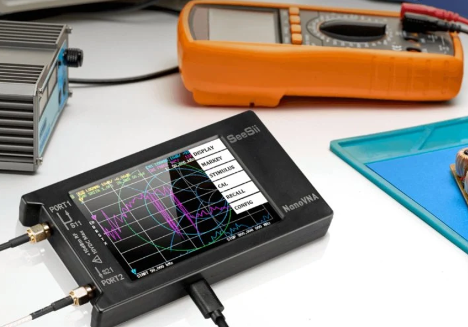
The term actually refers to two completely different categories of tools used in distinct industries. In the realm of computer networking, a protocol analyzer is a software application that intercepts and logs data traffic passing over a digital network. In the world of electronics and radio engineering, a vector network analyzer is a physical hardware device used to measure the electrical performance of high-frequency components like antennas and cables.
How Does a Network Analyzer Work?
A software-based protocol analyzer works by capturing data packets as they travel across a local area connection, decoding the information to reveal bandwidth usage and errors. Conversely, a hardware-based vector network analyzer works by actively generating a known electrical signal, sending it through a physical component, and measuring the signal that reflects or passes completely through the device.
How to Identify the Type You Need
Your choice depends entirely on your professional field and current project. If you are an IT administrator trying to figure out why a company website is loading slowly, you need a software packet sniffer. If you are an amateur radio operator trying to tune an antenna for better reception, you require a physical vector network analyzer.
What Does a Network Analyzer Measure?
The specific metrics you gather depend entirely on the variation of the tool you deploy. These instruments translate complex electronic behavior into readable data.
Bandwidth, Latency, and Packet Loss
Software analyzers excel at monitoring digital performance metrics. They measure bandwidth to show exactly how much data moves through your system at any given second. They track latency to determine the delay between a data request and its arrival, and they monitor packet loss to identify information that fails to reach its intended destination.
Network Protocols and Data Traffic
IT professionals use these software tools to look inside the actual data packets. The program can measure and categorize traffic based on specific communication protocols. This allows you to see if video streaming is consuming all your bandwidth or if malicious software is secretly sending data to an unauthorized external server.
Reflection, Transmission, and Impedance
Physical hardware analyzers measure how radio frequency signals interact with physical materials. They measure reflection to see how much energy bounces off a component and transmission to see how much energy successfully travels through it. They also measure impedance to ensure different components match properly, which prevents signal degradation across your hardware setup.
S Parameters
When using a vector network analyzer, the results are displayed as scattering parameters, commonly known as S parameters. These mathematical numbers describe exactly how radio frequency energy propagates through a multi port electrical network. Understanding these specific numbers is the ultimate key to tuning hardware for maximum performance.
What Is a Network Analyzer Used For?
Professionals rely on these devices to keep communications running smoothly and hardware functioning correctly. Their applications span from office IT departments to amateur radio workstations.
Troubleshoot Slow or Failed Connections
When a digital connection grinds to a halt, guessing the cause is a waste of time. Software analyzers pinpoint the exact source of network congestion. They reveal whether a faulty router, a failing network switch, or a bandwidth heavy application is responsible for the slow speeds, allowing technicians to apply a permanent fix.
Inspect Network Traffic
Cybersecurity experts use these tools to maintain a secure digital environment. By inspecting the flow of data packets, they can spot unauthorized access attempts and unencrypted sensitive information leaking out of the system. This deep level of inspection is a mandatory step in securing enterprise networks against modern threats.
Test Antennas, Cables, and RF Components
Hardware analyzers are heavily utilized by electrical engineers and hobbyists to verify the integrity of physical parts. They test coaxial cables for hidden internal breaks, tune radio antennas to specific broadcast frequencies, and evaluate filters to ensure they block unwanted noise. This testing guarantees your communication equipment operates clearly and reliably.
How to Use a Vector Network Analyzer
Operating a physical hardware analyzer requires a methodical approach to ensure accurate readings. Following a strict sequence prevents skewed data and protects your sensitive components.
Choose the Measurement
Before you touch any cables, you must determine what exactly you want to evaluate. Decide whether you need to measure the reflection of a single-port device like an antenna or the transmission through a two-port device like a frequency filter. Selecting the correct measurement mode prepares the internal software for the upcoming test.
Set the Frequency Range
You must tell the device which specific frequencies to scan. Input your desired start frequency and stop frequency on the main display screen. Setting a narrow sweep range around your target frequency provides much higher resolution and cleaner data than scanning the entire spectrum at once.
Calibrate the Analyzer
Calibration is the most critical step in the entire process. You must connect standardized open, short, and load calibration pieces to the end of your test cables. This process allows the machine to calculate and remove the natural electrical resistance of the cables themselves, ensuring you only measure the actual device under test.
Connect the Test Device
Once the calibration is complete and saved, remove the calibration pieces. Carefully attach your antenna or electronic filter to the test ports. Ensure the physical connections are snug, but avoid overtightening the delicate metal threads, as damaged connectors will ruin future readings.
Read S11 and S21 Results
Look at the digital display to interpret the data lines. The S11 reading shows return loss, indicating how much signal is reflecting back off your device. A lower S11 value generally means your antenna is well tuned. The S21 reading shows insertion loss, revealing how efficiently a signal passes through a filter or cable.
How to Choose a Network Analyzer
Selecting the perfect unit requires balancing your technical needs against the physical capabilities of the device. Careful consideration of your primary projects will guide your purchase.
Match the Tool to Your Task
Identify your primary operational environment. If you work entirely in digital systems, you simply need to download reputable analysis software to your laptop. If you build ham radios, repair drones, or design custom circuit boards, you absolutely must purchase a standalone hardware vector network analyzer.
Check the Required Features
For hardware units, maximum frequency range is the most important specification. A machine that tops out at one gigahertz is useless if you need to test five gigahertz Wi-Fi equipment. Always verify that the upper frequency limit of the machine exceeds the highest frequency you plan to test.
Consider Software, Hardware, and Accessories
Evaluate the physical form factor and the included accessories. Benchtop models offer massive screens but are tethered to a wall outlet. Handheld units provide incredible mobility for outdoor antenna work. Look for kits that include high-quality calibration pieces and protective cases to keep your delicate equipment safe during transport. If you require exceptional portability without sacrificing technical capabilities, Seesii TinySA Ultra Plus Spectrum Analyzer delivers powerful frequency analysis in a highly compact design that easily travels to any job site.
Balance Accuracy and Budget
Professional laboratory-grade analyzers cost thousands of dollars and offer pinpoint accuracy. However, modern budget-friendly handheld units provide more than enough precision for amateur radio operators, students, and DIY electronics enthusiasts. Determine your actual tolerance for minor measurement deviations to avoid overspending on laboratory features you will never utilize.
Conclusions
Network analyzers are indispensable instruments for maintaining optimal digital and physical communications. Whether you deploy software to track digital packet loss or use a physical device to tune a radio antenna, these tools remove the guesswork from diagnostics. By understanding your specific technical requirements, mastering the calibration process, and choosing a device that matches your frequency needs, you can troubleshoot connections efficiently and ensure your equipment operates at peak performance.