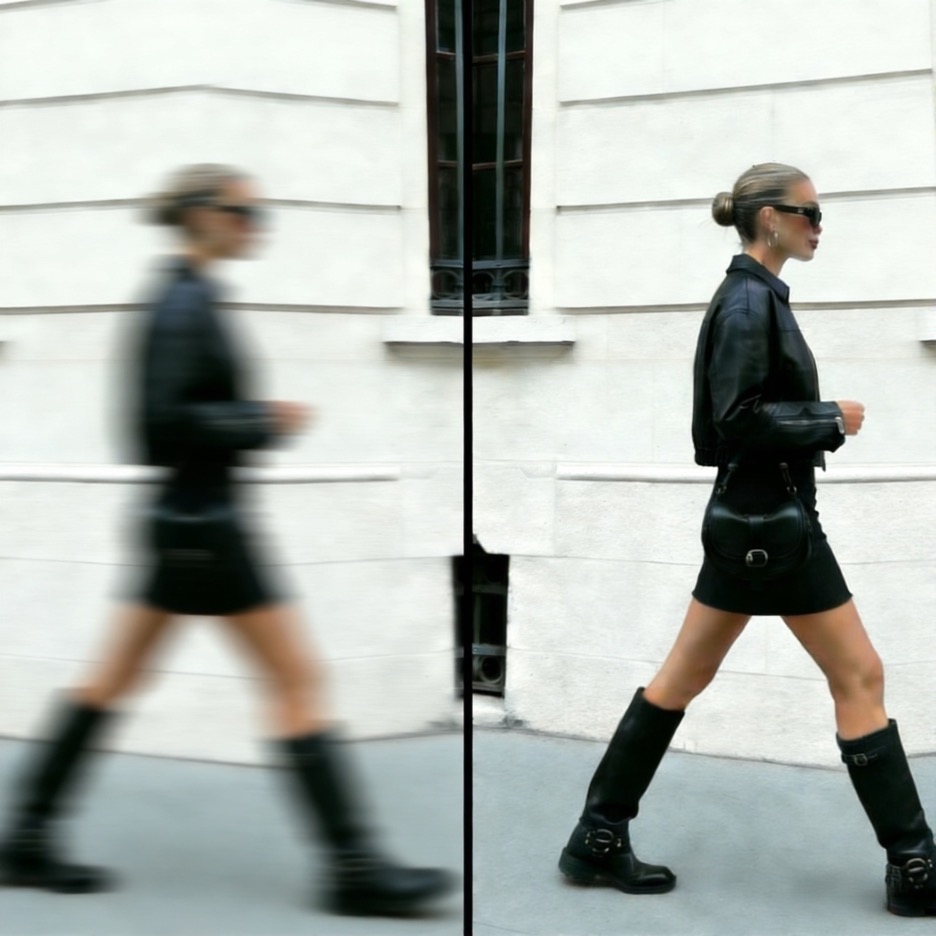
Top 5 AI Tools to Fix Blurry Photos Without Photoshop in 2026
We’ve all been there. You capture a perfect moment, a priceless memory, only to find out later the photo is blurry. Motion, a slight camera shake, or a missed focus can ruin an otherwise great shot. For years, fixing these images meant learning complex and expensive software like Photoshop. Thankfully, that’s no longer the case.
AI has revolutionized photo editing, offering powerful tools that can sharpen, clarify, and restore blurry pictures in seconds. These smart algorithms analyze your image, understand the source of the blur, and intelligently correct it. You don’t need any technical skills to get professional results. This guide will walk you through the top five AI tools to fix your blurry photos in 2026, so you can rescue your favorite memories with just a few clicks.
Top 1: UnblurImage AI
Overview
UnblurImage AI is a specialized tool designed with one primary goal: to deliver exceptional clarity. It focuses entirely on fixing blur and restoring image details, making it a powerful choice for users who need a dedicated solution. The platform uses advanced algorithms to correct various types of blur, from general out-of-focus shots to motion blur. Its straightforward interface allows you to Unblur Image files without a steep learning curve, making it accessible to everyone.
The technology is particularly effective at identifying and reconstructing fine details that are lost in a blurry photo. Beyond simple sharpening, the tool also offers impressive capabilities for reviving old and damaged pictures. Many users find its Old Photo Restoration feature incredibly useful for bringing new life to faded family albums and historical photographs, correcting colors and fixing imperfections automatically.
Key Features
* AI-Powered Deblurring: Intelligently detects and corrects motion blur, focus blur, and general haze.
* Detail Enhancement: Reconstructs facial features, textures, and small details that were previously hidden.
* Batch Processing: Allows users to upload and enhance multiple photos at once, saving significant time.
* Vintage Photo Repair: A dedicated mode for restoring old, faded, or slightly damaged photographs, correcting colors and removing scratches.
Pros & Cons
* Pros:
* Extremely easy to use with a simple drag-and-drop interface.
* Highly effective results, especially for out-of-focus images.
* Free to use for basic enhancements.
* Specialized tools for old photo restoration.
* Cons:
* Lacks comprehensive manual editing tools like cropping or filters.
* Free version may have limits on image size or number of enhancements.
Best For
UnblurImage AI is perfect for individuals who need a fast, reliable, and straightforward tool to fix blurry photos. It’s ideal for beginners, social media users, and anyone looking to restore old family pictures without getting bogged down in complex settings.
Top 2: Fotor
Overview
Fotor is a well-known name in the online photo editing space, and its AI Photo Enhancer is a testament to its evolution. Unlike specialized unblurring tools, Fotor is an all-in-one editing suite. Its “1-Tap Enhance” feature is the star of the show, automatically adjusting brightness, saturation, and sharpness to improve overall image quality. It’s a great option if your photo needs more than just a clarity boost.
The platform combines the simplicity of AI with the flexibility of a traditional photo editor. After enhancing your image, you can easily make further adjustments, add filters, apply effects, or create a collage. This makes Fotor a versatile tool for users who want to fix a blurry photo and then continue editing it for a specific purpose, like a social media post or a marketing graphic.
Key Features
* 1-Tap Enhance: Automatically improves image quality, including sharpness, with a single click.
* AI Enlarger: Upscales images to a higher resolution without losing significant detail.
* Full Editing Suite: Includes tools for cropping, rotating, adding text, applying filters, and more.
* AI Retouching Tools: Offers specific features for enhancing portraits, such as smoothing skin and removing blemishes.
Pros & Cons
* Pros:
* Comprehensive suite of editing tools in one place.
* The AI enhancer works well for general quality improvements.
* Available on web, desktop, and mobile platforms.
* Good for users who need more than just unblurring.
* Cons:
* The best AI features are often locked behind a premium subscription.
* Can feel bloated if you only need a quick fix for blur.
Best For
Fotor is best for content creators, marketers, and hobbyists who need a single platform for both AI enhancement and general photo editing. It’s a great choice if you want to fix a blurry photo and then immediately start working on other creative adjustments.
Top 3: Remini
Overview
Remini made a huge splash in the market, especially on social media, for its almost magical ability to enhance portraits and selfies. It uses generative AI to reconstruct faces with stunning clarity. If your blurry photo is of a person, Remini is often the best tool for the job. It excels at creating sharp, detailed facial features even from very low-quality source images.
While its primary strength is in portraits, Remini also offers a general photo enhancer that works on landscapes, objects, and other subjects. It has expanded its features to include video enhancement and AI avatar generation, making it a popular app among influencers and casual users alike. The results can be dramatic, but sometimes they can look a bit over-processed, so it’s a matter of personal taste.
Key Features
* AI Portrait Enhancement: World-class technology for restoring facial details in blurry or low-resolution photos.
* Video Enhancer: Applies the same AI technology to improve the quality of blurry or old videos.
* AI Avatar Generator: Creates stylized portraits based on your uploaded photos.
* Background Enhance: Improves the clarity and detail of the entire image, not just the subject.
Pros & Cons
* Pros:
* Unmatched results for enhancing human faces.
* Extremely simple and fast mobile app experience.
* Free version is available with ads and limitations.
* Includes video enhancement capabilities.
* Cons:
* Results can sometimes look artificial or “airbrushed.”
* The free version limits the number of enhancements per day.
Best For
Remini is the go-to tool for anyone looking to fix blurry photos of people. It’s perfect for enhancing old family portraits, blurry selfies, or any shot where facial clarity is the top priority.
Top 4: VanceAI
Overview
VanceAI is a suite of AI-powered tools designed for various image processing tasks. Instead of a single “enhance” button, it offers a collection of specific tools, including an AI Image Sharpener, Denoise AI, and an AI Image Enlarger. This modular approach gives you more control over the enhancement process. You can choose the exact tool you need, whether it’s to reduce grain, sharpen edges, or increase resolution.
This platform is geared toward users who have a better idea of what their image needs. For example, if your photo is blurry due to digital noise, you can use the Denoise AI tool first before sharpening it. This workflow can produce more refined results than a one-size-fits-all solution. The trade-off is that it requires a bit more effort, as you might need to run your image through multiple tools to get the desired outcome.
Key Features
* AI Image Sharpener: Specifically targets and corrects motion and focus blur.
* AI Denoise: Removes digital noise and grain from photos taken in low light.
* AI Image Enlarger: Increases image resolution up to 8x without significant quality loss.
* Dedicated AI Workflows: Offers tools for photo restoration, background removal, and more.
Pros & Cons
* Pros:
* A wide range of specialized tools provides granular control.
* High-quality results for specific problems like noise or low resolution.
* Offers batch processing for paid users.
* Provides more advanced options than simpler enhancers.
* Cons:
* The credit-based system can be confusing for new users.
* Requires using multiple tools for a single photo, which can be time-consuming.
Best For
VanceAI is ideal for photographers, graphic designers, and prosumers who need precise control over the image enhancement process. It’s great for users who can identify the specific issue with their photo (e.g., noise vs. focus blur) and want a dedicated tool to fix it.
Top 5: PicWish
Overview
PicWish is a user-friendly AI photo editor that focuses on creating clean, professional-looking images with minimal effort. Its AI Photo Enhancer tool is designed for quick and effective results, making it easy to fix blurry photos in seconds. The platform is particularly popular for its background removal and object removal tools, which are incredibly useful for creating product photos for eCommerce or marketing materials.
While its unblurring capabilities are solid, PicWish shines brightest when used for commercial purposes. You can unblur a product shot, remove its background, and resize it for an online store listing all within the same platform. Its interface is clean and intuitive, ensuring that even users with no editing experience can achieve great results.
Key Features
* AI Photo Enhancer: Sharpens details and improves the overall quality of blurry images.
* Accurate Background Remover: Quickly creates transparent backgrounds for products or portraits.
* Magic Eraser: Seamlessly removes unwanted objects or people from photos.
* Batch Editing: Allows you to enhance, remove backgrounds, or resize hundreds of images at once.
Pros & Cons
* Pros:
* Very simple and intuitive interface.
* Excellent tools for eCommerce and marketing visuals.
* Batch processing is a key feature, even in the free trial.
* Fast processing times.
* Cons:
* The unblurring feature is less powerful than specialized tools for severely blurry images.
* Some features require a subscription or credits.
Best For
PicWish is an excellent choice for eCommerce sellers, small business owners, and marketers who need to quickly edit and enhance images for commercial use. Its combination of enhancement and background removal tools makes it a highly efficient workflow solution.
Comparison Summary
Here’s a quick look at how these five AI tools stack up against each other.
| Tool | Best For | Key Feature | Ease of Use |
| UnblurImage AI | Fast and dedicated blur correction | AI Deblurring & Restoration | Excellent |
| Fotor | All-in-one photo editing | 1-Tap Enhance | Very Good |
| Remini | Enhancing blurry faces and portraits | AI Portrait Enhancement | Excellent |
| VanceAI | Precise, controlled adjustments | Suite of specialized AI tools | Good |
| PicWish | eCommerce and product photos | Background & Object Removal | Excellent |
Final Recommendation
Choosing the right AI tool depends entirely on your needs. There is no single “best” tool for everyone, but there is a best tool for your specific task.
* For the most direct and effective solution to fix a blurry photo, especially an old family picture, UnblurImage AI is your top choice. Its specialized focus delivers clean, sharp results with zero hassle.
* If you need a comprehensive editor to enhance a photo and then add text, filters, or other creative touches, Fotor is the most versatile option.
* When your blurry photo is a portrait or selfie, nothing beats Remini. It works wonders on facial features.
* For professionals and enthusiasts who want maximum control over the enhancement process, VanceAI provides a powerful suite of specialized tools.
* Finally, if you’re an eCommerce seller or marketer, PicWish offers an efficient workflow for enhancing product shots and preparing them for online use.
Conclusion
You no longer have to delete a cherished photo just because it’s a little blurry. Thanks to these powerful AI tools, anyone can restore and enhance images without needing to be a Photoshop expert. From specialized unblurring platforms to all-in-one editors, the right solution is out there. By identifying what you need—whether it’s facial reconstruction, all-purpose editing, or simple clarity—you can pick the perfect tool and bring your favorite memories back into sharp focus.