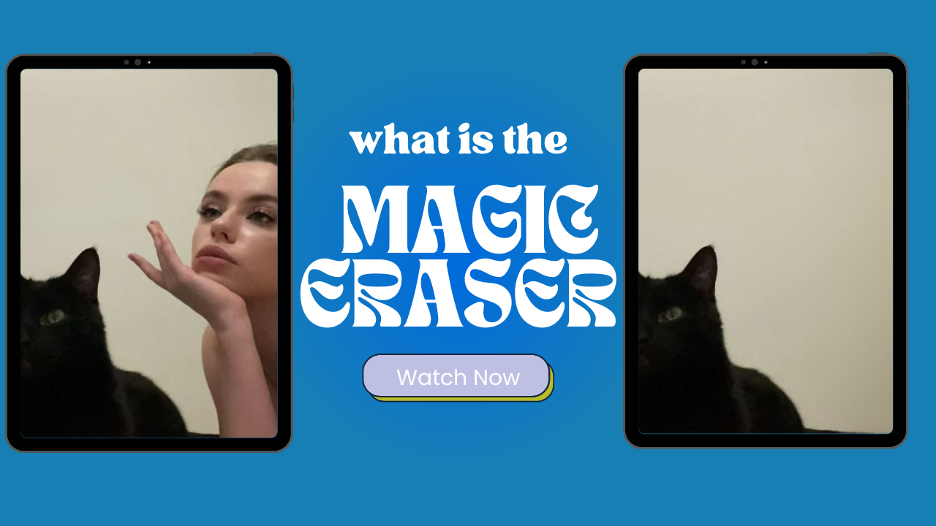
Top 5 AI Background Object Removers for Perfect Travel Photos
Nothing ruins a great travel photo faster than a stray tourist or an unsightly trash can in the background. For years, removing these unwanted elements required complex software and advanced editing skills. Today, AI object removers let you clean up your photos in just a few clicks, giving you a perfect shot every time. These tools use powerful algorithms to intelligently identify and erase objects, seamlessly filling in the background.
Finding the right tool can be a challenge with so many options available. We’ve reviewed the best platforms to help you find the perfect fit for your needs. Whether you’re a professional photographer or just want to improve your vacation pictures, there’s a tool here for you. We’ll break down the top 5 AI object removers, looking at their features, performance, and ideal use cases to help you make the best choice.
Top 1: Magic Eraser
Magic Eraser is a straightforward and highly effective tool dedicated to one primary task: removing unwanted objects from photos. Its simplicity is its greatest strength. You don’t need an account to get started, you just upload your image, highlight what you want to remove, and let the AI do the work. The tool is web-based, making it accessible from any device without requiring any downloads. This makes it a go-to for quick and simple edits.
The platform offers a clean interface that puts the focus entirely on the editing process. You can use the Magic Eraser to quickly remove people, text, or any other distractions from your images. For those looking for more comprehensive editing capabilities beyond object removal, the platform also provides a Free AI Image Editor that includes a wider range of features to enhance your pictures.
Key Features
* Simple brush tool for highlighting objects.
* Fast AI-powered object removal and background reconstruction.
* No sign-up required for basic use.
* Unlimited free usage with a small watermark.
* Pro plan available for high-resolution downloads and no watermark.
Pros & Cons
Pros:
* Extremely easy to use, perfect for beginners.
* Completely free for standard resolution edits.
* Fast processing times.
* Web-based, so no software installation is needed.
Cons:
* Limited to object removal on the free tool.
* Free downloads are size-limited and watermarked.
* Lacks advanced editing features like color correction or filters.
Best For
Quick, one-off edits for social media posts or personal photos where speed and simplicity are the top priorities.
Top 2: PhotoRoom
PhotoRoom is a versatile photo editor that excels at background removal and object editing, making it a favorite among online sellers and content creators. While its primary feature is creating clean, studio-quality product shots by removing backgrounds, its object removal tool is equally powerful. The “Retouch” feature allows users to erase unwanted objects, people, or text with impressive accuracy.
The app is available on both mobile and desktop, providing a seamless workflow across devices. PhotoRoom’s AI is particularly good at handling complex backgrounds, making it a reliable choice for more challenging edits. It also offers a variety of templates and background options, allowing you to not only clean up your image but also place your subject in a new setting.
Key Features
* High-precision object and background removal.
* Batch editing mode for processing multiple images at once.
* Large library of background templates and design elements.
* Instant background generation for product photos.
* Available on iOS, Android, and web.
Pros & Cons
Pros:
* Excellent for creating professional product images.
* Batch processing saves time for high-volume users.
* User-friendly interface on both mobile and web.
* Offers more than just object removal, including background replacement.
Cons:
* The free version has limitations, including a PhotoRoom watermark.
* Some advanced features are locked behind the Pro subscription.
* Can be more than what’s needed for simple object removal.
Best For
E-commerce store owners, marketers, and social media managers who need to create professional product listings and promotional content.
Top 3: Fotor
Fotor is a comprehensive online photo editing suite that offers a wide array of tools, including a powerful AI object remover. Marketed as an all-in-one solution, Fotor goes beyond simple object removal to provide features for photo enhancement, collage making, and graphic design. Its object remover is intuitive, allowing you to simply paint over the unwanted element and let the AI take care of the rest.
Fotor’s AI is effective at handling different types of objects and backgrounds, delivering clean results with minimal effort. Because it’s part of a larger editor, you can seamlessly move from removing a photobomber to adjusting the brightness, applying a filter, or adding text. This integration makes it a great option for users who want to perform multiple edits within a single platform.
Key Features
* AI-powered object remover for clean edits.
* Full suite of photo editing tools (enhance, crop, filters).
* Graphic design and collage-making capabilities.
* Supports a wide range of image formats.
* Cloud storage for saving and accessing projects.
Pros & Cons
Pros:
* All-in-one platform for editing, design, and retouching.
* The object remover is effective and easy to use.
* Generous free plan with access to many basic tools.
* Templates available for various social media platforms.
Cons:
* The most powerful features and highest quality downloads require a Pro subscription.
* The interface can feel cluttered with so many options.
* Processing can sometimes be slower than dedicated remover tools.
Best For
Users who want a single platform for all their photo editing and basic graphic design needs, from object removal to final enhancements.
Top 4: Picsart
Picsart is a household name in mobile photo editing, and for good reason. It’s a creative powerhouse packed with an enormous selection of tools, and its AI Remove tool is among the best. Designed for a mobile-first audience, Picsart makes it easy to remove objects, people, or blemishes directly from your phone. The tool is very responsive and delivers natural-looking results, even on detailed backgrounds.
Beyond object removal, Picsart offers layers, blending modes, filters, text overlays, and a massive community that shares creative content and tutorials. This makes it more than just a utility; it’s a platform for creative expression. If you enjoy experimenting with your photos and adding artistic flair, Picsart provides all the tools you need in one place.
Key Features
* Intuitive AI-powered object removal tool.
* Extensive library of filters, effects, and stickers.
* Full-featured editor with layers and drawing tools.
* Strong community features for sharing and inspiration.
* Available on both mobile and as a web editor.
Pros & Cons
Pros:
* Excellent performance on mobile devices.
* Huge range of creative editing tools.
* The free version is very capable.
* Active community for tutorials and creative ideas.
Cons:
* The app can be overwhelming for new users.
* Frequent ads and prompts to upgrade to the Gold subscription in the free version.
* Best features are behind a paywall.
Best For
Mobile users and creative individuals who want a powerful, all-in-one editor for making artistic and shareable content.
Top 5: Canva
Canva is primarily known as a user-friendly graphic design platform, but it has steadily added powerful photo editing features to its arsenal. One of the standout additions is the “Magic Eraser,” available to Canva Pro users. Integrated directly into Canva’s editor, this tool allows you to remove unwanted objects from any photo you upload. You simply brush over the object, and it disappears.
The biggest advantage of Canva’s tool is its seamless integration into the design workflow. You can remove a distracting element from a photo and immediately use that cleaned-up image in a social media graphic, presentation, or poster without ever leaving the platform. This is incredibly efficient for anyone who uses Canva for their marketing or design projects.
Key Features
* “Magic Eraser” tool for easy object removal.
* Fully integrated into the Canva design platform.
* Access to a massive library of templates, stock photos, and design elements.
* Collaborative features for team projects.
* Works on web and mobile.
Pros & Cons
Pros:
* Perfect for users already working within the Canva ecosystem.
* Streamlines the content creation process.
* Extremely easy to use with a simple brush interface.
* Part of a much larger suite of powerful design tools.
Cons:
* The Magic Eraser feature is only available to Canva Pro subscribers.
* Not a dedicated photo editor, so it lacks advanced retouching tools.
* Less precision control compared to specialized software.
Best For
Marketers, content creators, and small business owners who already use Canva for graphic design and want an integrated tool for quick photo cleanups.
Comparison Summary
To help you decide, here’s a quick comparison of the top 5 AI object removers.
| Tool | Ease of Use | Primary Function | Pricing Model |
| Magic Eraser | Very High | Object Removal | Freemium |
| PhotoRoom | High | Background & Object Removal | Freemium |
| Fotor | High | All-in-One Photo Editing | Freemium |
| Picsart | Medium | Creative & Social Editing | Freemium |
| Canva | Very High | Graphic Design & Editing | Freemium (Pro Required) |
Final Recommendation
Choosing the best AI object remover depends entirely on your needs. Each tool offers a unique blend of features, simplicity, and power.
If you need a fast, free, and no-fuss tool for a quick fix, Magic Eraser is the undisputed winner. It does one thing and does it exceptionally well without any barriers.
For e-commerce sellers and marketers, PhotoRoom is the ideal choice. Its focus on creating clean, professional product shots and its batch processing capabilities can save you hours of work.
If you’re looking for an all-in-one solution that handles everything from object removal to color grading and graphic design, Fotor provides a comprehensive and accessible suite of tools.
For the creative user who loves to edit on the go, Picsart offers an unmatched mobile experience with a vast array of artistic tools alongside its powerful object remover.
Finally, if you already live and breathe in the Canva ecosystem, the Canva Magic Eraser is a logical and efficient choice. It streamlines the process of cleaning up photos for your design projects, keeping your entire workflow in one place.